Hypertext & Hypermedia
To Do This Week
read/explore:
- With Those We Love Alive, Porpentine (2014)
Journal
Hypertext — hyperlinks connecting documents — opens up new ways to write, think and connect with others in networks. Hypertext created the web, spawned new forms of art and ways of presenting knowledge.
A digital story can be made of hyperlinks that follow a linear sequence, like pages of a book. But what about multilinear networks, random access and user interactivity — computer properties that break away from strictly linear sequencing? Digital games certainly use narrative forms and there is a rich history of literary fiction that have game-like qualities. Can the computer do for storytelling what it has done for gaming? What kind of stories work best in digital form?
Explore With Those We Love Alive by Porpentine listed above. Be patient, things start to happen the more you explore. Journal about how the work is a story and how it is not story. Is there a coherent story world? What keeps you imaginatively engaged? Do you detect a plot and character development? How does the navigation structure bring you into the story? Is linear sequencing clear, vague or unimportant?
In Class
Video/Audio Narrative assignments DUE Thursday March 26
In-Class Videos
Works
- My Boyfriend Came Back from the War, by Olia Lialina (1996)
- How to Rob a Bank, by Alan Bigelow (2016)
- With Those We Love Alive, Porpentine (2014)
Notes
What is the relationship between the world simulation, interaction and plot?
Ian Bogost
- system operations (big goals, narrative arcs)
- unit operations (small actions, steps in a process)
System operations are like the familiar narrative shell of game play: kill aliens, find gold, capture treasure, etc. Movie plots — romance, adventure, thriller — all have system operations. “protracted, dependent, sequential, and static” — universalising structures. Grand themes.
Unit operations are the small repetitive actions — steps in a process — that carry on the game play towards the larger plots. “succinct, discrete, referential, and dynamic”
The Terminal (2004): theme of characters waiting — for love, recognition, or for a visa. How theme of waiting interacts with characters, setting creates meaning. Episodic micro-narratives (unit operational) rather than plot-oriented.
Twine and Unit Operations
With Those We Love Alive: We don't know the goal of the game. We are thrown into unit operations. Giving choices for the player/reader to traverse a world. A mental model of a world develops over time. Engaging the imagination and building suspense.
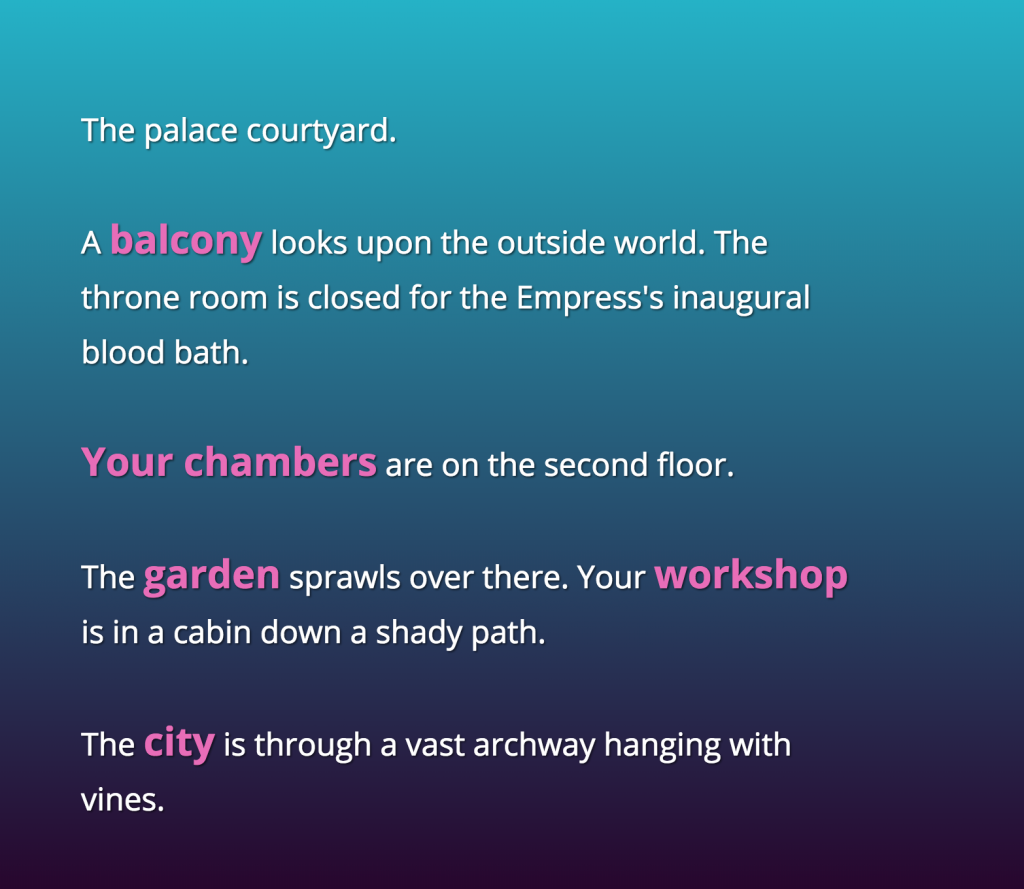
- Set the scene. Where are we at start? The task to explore/discover the story-world.
- Connect spaces (links allow traversal of spaces) — surprises along the way.
- Place obstacles, objects, characters and other narrative details.
- Set some challenges (narrative conflict) along the way to reaching goal (game play).
- Add narrative or poetic detail, evoke a world or character.
- Make a way out, end point(s) or goal(s).
Hypermedia Narrative (15%) - DUE APRIL 16
Digital stories created for a computer environment can include non-linear navigation, direct access to data, variables, conditionals, interface design, random and parallel processes, hyperlinks, timed events, sound, image, video, and other forms of user interaction or agency. Unlike a traditional printed story, a hypermedia narrative can respond to the choices, actions, and attention of the reader/user.
“Hypermedia” refers to linked media. A hypermedia work may guide a user along a mostly linear path, or it may branch, loop, fragment, or open into a network of story elements. Some works are primarily text-based. Others combine text with sound, graphics, symbols, animation, photography, video, or interactive interface elements. Repetition, variation, discovery, and choice can all become part of the storytelling experience.
In this assignment, you will create an interactive story meant to be explored or experienced by a reader/user on a computer screen. Your project may be made in Twine (the downloaded desktop version only, not the online version) or you may build your own interactive project using HTML, CSS, and JavaScript. If you build your own project, you may use AI tools such as ChatGPT or Claude.ai to help you brainstorm, plan, troubleshoot, or generate code, but you are still responsible for understanding, shaping, and crediting the work you submit.
Your project can include game-like elements such as exploration, puzzles, scoring, inventory, or simple goals, but it must function first and foremost as a story experience. The reader/user should encounter characters, events, situations, memories, environments, or conflicts that unfold through interaction. In other words, this is not simply a game mechanic demo. It is an interactive narrative.
Project Possibilities
Your narrative may be:
- Branching, where user choices lead to different paths or endings
- Open, where a storyworld is explored in multiple orders
- Linear/guided, where interaction shapes pacing, mood, or emphasis even if the main sequence is mostly fixed
- Procedural or variable-based, where story elements change based on reader actions, stored values, or randomness
- Text-based, or a multimedia work that includes sound, graphics, symbols, image, animation, or video
Requirements
- Create an interactive story designed for screen-based experience
- Use either the downloaded version of Twine or your own HTML/CSS/JavaScript project
- Include meaningful user interaction, not just passive reading or viewing (like "next" buttons
- Show a clear relationship between interaction and storytelling
- Demonstrate intentional structure, whether branching, exploratory, looping, or guided
- If using AI tools for coding or ideation, document that use in a short process note on a credits or about page.
- Every project must have a title and an author name!
What Matters Most
- Story concept: Is there an engaging situation, world, voice, character, or conflict?
- Interactive design: Do user choices, navigation, or actions meaningfully shape the experience?
- Structure: Is the organization of paths, scenes, lexias, or interactions clear and intentional?
- Use of media: If you include sound, image, symbols, or video, do they contribute to the story rather than distract from it?
- Craft: Is the piece readable, usable, and thoughtfully designed?
- Ambition and experimentation: Does the project explore what digital storytelling can do that print cannot?
Goal
This assignment is an opportunity to explore storytelling as a computational, interactive, and multimedia form. Think of it as a contained experiment or prototype that could become the foundation for a larger final project. The strongest projects will not simply present content on a screen, but will use interaction, structure, and media to create a distinct narrative experience.
Student Hypermedia Stories
- bethany-dubeck-narrative
- 2084 - Ross Griffus
- <Bed Bug - Holly Slocum
- Escape: A Refugee Story - Madeleine Brookman
ChatGPT or Claude.ai
Use AI tools to generate HTML/CSS pages. Create your own web hypertext and hypermedia (image, audio and video) story.
Twine Intro
Twine Resources
- Twine — download is better than using Twine online!
- Twine template (ZIP) — this is a zip containing both the simple and advanced templates discussed in the video. Just import the two HTML files into Twine and play around. Also, you can click the HTML files in this folder to test them in a browser and see the image.
- Example Twine: The Tiniest Room
- Twine 2 Guide
- Twinery Cookbook
- Twine cheat-sheet
- Random text
- Twine with video - Caleb Sternberg
- A Good Guide for more advanced stuff
Twine Stories for Inspiration
-
With Those We Love Alive, by Porpentine (2014)
With Those We Love Alive is an evocative and atmospheric story that explores themes of identity, memory, and trauma. The game has been praised for its surreal, dreamlike narrative and innovative use of multimedia elements.
-
Depression Quest (2013) — Created by Zoe Quinn, Patrick Lindsey, and Isaac Schankler
Depression Quest is an interactive fiction game that aims to simulate the experience of living with depression. The game has received praise for its empathetic portrayal of mental health struggles.
-
My Father's Long, Long Legs (2013) — Created by Michael Lutz
This horror story is about a family dealing with the father's strange transformation as he digs a mysterious hole in their basement. The game is notable for its eerie atmosphere and effective use of suspense.
-
The Uncle Who Works for Nintendo (2014) — Written by Michael Lutz, featuring music by Kevin MacLeod
This horror game puts the player in the shoes of a young child spending the night at their friend's house. The game incorporates elements of urban legends and the creepypasta genre to build tension and unease.
- Howling Dogs, Porpentine