Week 7: Storyboards & Pre-visualization
To Do This Week
- Workshop your beats in your group's Slack channel.
- Write your formatted script (see Script Formatting Resources).
- Post your formatted script in your group's Slack channel by Wednesday, Oct 14.
Module Notes
Student Sound Projects
Visual Storytelling
Primer
- Storytelling = shaping attention, not recording reality.
- Swim around the story to find its essence—images, sounds, rhythms.
- Cinema is magic: a few key images unlock the whole story.
- Audience Participation: Use key images/sounds to tell your story; let audience connect the rest.
Why Storyboards?
- Translate script beats → camera language.
- Plan framing, movement, pacing before shooting. A map for production - not fixed.
- Reveal gaps early; save time in production.
- The Sixth Sense - Moving Pictures: The Storyboard Process
- Taxi Driver - Scorsese on the Storyboard Process
Key Storyboarding Concepts
- Thumbnail vs. Key Frame: quick rhythm sketches vs. polished “hero” shots.
- Shot Arrows: pan = curved, dolly = straight, zoom = concentric/or frame corner arrows.
- 180° Check: keep camera on one side of the line of action.
- Shot List Columns: # · type · lens/angle · movement · duration · audio.
Pitch Deck Schedule
Ten steps across three weeks. Full requirements are in the Pitch Deck Assignment below.
Tue, Oct 6: Explore Your Story Visually
Work on your own to explore your idea through rough storyboarding and settle on the 3–6 beats of your 1–2 minute story. This sets you up to write your formatted script.
- Enter the Story World: Close your eyes and wander through your story world. Notice colors, textures, sounds, and character details. Write or sketch what you discover.
- Select Core Beats: A beat is a significant moment that drives the narrative forward. Choose 3–6 scenes or moments with the strongest emotional or visual power, and reduce your story idea to these essentials. Other shots can be transitional or used for elaboration. Ask yourself: Is the climax or twist the strongest beat? How does the end relate to the beginning? What can you plant in the beginning to pay off at the end?
- Shape into Three Parts: Divide your beats into roughly 10–20% setup, 60–80% development (reversal/twist), and 10–20% resolution. Write a 2–3 sentence logline that describes your story through this three-part structure.
- Connect the Parts: Decide how the pace unfolds (fast → slow, slow → fast, montage vs. continuity). Explore how the three sections link visually and narratively to reveal a twist or change.
- "Tell" with Images (Rough Storyboard): For each core beat, sketch rough frames. Think about how framing, blocking (the arrangement of figures in the frame), gestures, and facial expressions can replace dialogue.
End of class: Form your groups. Each group creates a Slack channel and adds me to it.
Thu, Oct 8: Moodboards, Beats & Script Formatting
I'll go over moodboards and script formatting in detail. You'll also meet with your group to share and develop your story beats.
Before Next Thursday: Script Drafts
- Write & Minimize Dialogue: Using your beats and rough storyboard, write your formatted script. Let images and actions carry the meaning. Use dialogue only when necessary, and never to explain.
Post your formatted script in your group's Slack channel by Wednesday, Oct 14. Read each other's scripts and take feedback notes on each one. I will also give feedback. If you don't have a script for the discussion, you will lose points. Your draft should be close to final.
Thu, Oct 15: Script Workshop
Small-group discussions of each script. After the group discussion and my feedback, you'll develop your final script. Storyboards and production design are finalized only after your group and I approve the script.
Due Thu, Oct 22: Pitch Deck
- Final Storyboard with Shot Details: Sketch frames labeled with shot type and duration, arrows for movement, and sound cues. Think in frames: wide → detail, detail → wide.
- Moodboard: From your storyboard and script, explore a color palette and production style. Gather film stills and/or AI-generated images from descriptions of favorite movies (explore film stock and lens). Capture mood through color, texture, and design elements. Think about genre and time period.
- Production Style Notes: Alongside the moodboard, write a short description of how your story will look and feel: color palette, lighting, and design choices.
- Assemble a Google Slides Pitch Deck: Add screen captures of your final script, final storyboard, and moodboard images with your production notes. Go to Share > Publish to web to get a link. Submit the link to Canvas and share it on Slack.
Pitch Deck Assignment (15%)
Script (5%) – completed Oct 15
Storyboard (5%) & Moodboard (5%) – submitted with Script by Oct 22
This is a self-contained project. You will design a short cinematic idea and express it through three complementary pre-production elements: a script, a storyboard, and a mood board. You will not be required to edit or shoot this project later; the goal is to practice translating an idea into clear, compelling visual storytelling. Be imaginative and unconstrained by budget while focusing on story structure, cinematic language, and visual design. Each component is worth 5% for a total of 15%.
Group Workshopping & Beat Sheets
Students will begin by discussing story ideas in small groups. Each student will develop a beat sheet—a brief outline of the key beats and emotional turns of their story—and share it with their group for approval and suggestions. Only after receiving group feedback will students write their individual script drafts. Each group will create a Slack channel (with me included) where drafts of beat sheets and scripts are posted for feedback and suggestions. Storyboards and production design details are created only after group approval of the script.
1. Script (5%)
- Length: 60–120 seconds (about 1–3 pages).
- Format: Proper screenplay style (scene headings, action, dialogue). See Script Formatting Resources.
- Goal: Demonstrate a clear narrative arc (beginning–middle–end or an alternative but coherent structure), conflict, and resolution, and ideally a twist.
- Process: Start with a group-approved beat sheet, then write your script individually. Post drafts to your group Slack channel for feedback before finalizing.
2. Hand-Drawn Storyboard (5%)
- Medium: Pencil/pen sketches or digital drawing (hand-rendered look preferred).
- Panels: A frame for each planned shot showing composition, angle, and movement. Drawings should be simple but clear.
- Notes under each frame:
- Shot type (CU, WS, POV, OTS, etc.).
- Camera movement (pan, tilt, dolly, handheld, static, etc.).
- Key sound cues (dialogue, effects, ambience, music) and any timing beats.
- Goal: Visualize the story shot-by-shot, demonstrating how framing, movement, and editing shape meaning.
- Timing: Begin your storyboard only after your script has been approved by your group.
3. Mood Board / Production Design (5%)
- Images: Collect 5–10 images (AI-generated and/or screen grabs) that convey look and feel.
- Focus: Style, color palette, lighting, settings, costumes, and character design.
- Notes: Brief description about visual design, mood and overall tone.
- Timing: Create your mood board after your script has been approved by your group.
- Goal: Present a cohesive design sense and color palette that communicates the project’s atmosphere and style. See Moodboard Resources.
Submission
Submit your finished project as a Google Slides show, with the URL to the slideshow uploaded to Canvas. It should include:
- Use Google Slides for all the elements of your Pitch Deck.
- First page: Title, 2-3 sentence description or logline and the author's name.
- Screen grabs for the sequential parts of your screenplay-formatted final script - fit so the screenplay can be read inside the slideshow.
- Digital photos or scans of your storyboard.
- Images for the production design/mood board elements with a brief description of the style you are aiming for.
- Optional: share the URL to the slideshow on Slack.
Purpose
This assignment builds core skills in conceiving and communicating a cinematic concept—useful for social media videos and traditional film contexts alike. Even though it will not be produced in this class, your pitch deck should read as if it could guide an actual production.
Script Formatting Resources
You don't need to pay for screenwriting software. Everything below is free, and most of it runs on one shared plain-text format called Fountain, so a script you start in one tool opens in the others.
The short version: write in plain text, mark up scene headings, character names and dialogue with a few simple rules, and let a tool lay it out in standard screenplay format (Courier 12 pt, roughly one page per minute of screen time). Click a section below to open it.
Read Real Screenplays
Before you format your own script, read a few pages of produced ones to see how the format looks in practice.
- Good Will Hunting (1997): screenplay by Matt Damon and Ben Affleck (PDF)
- The Sixth Sense (1999): screenplay by M. Night Shyamalan (PDF)
- Finding Nemo (2003): screenplay by Andrew Stanton, Bob Peterson and David Reynolds (PDF)
Use AI to Format an Unformatted Script
If you've drafted your script as loose prose or in a regular doc, an AI chatbot (Claude, ChatGPT, Gemini, Copilot) can convert it for you. The trick is to ask for Fountain output rather than "a formatted screenplay." A chat window can't show true page layout, but Fountain is plain text, so you can paste the result into any tool below and get correct formatting instantly.
- Copy your draft.
- Paste it into the chatbot with the prompt below.
- Copy the Fountain text it returns.
- Paste it into Beat (Mac), Afterwriting (any browser), WriterSolo, or a Google Doc with Fountainize, and export a PDF.
- Read the PDF against your original draft, line by line.
Prompt to copy
Convert the following draft into Fountain screenplay format. Do not change, add, cut, or rewrite any of my words: only format them. Use scene headings (INT./EXT. LOCATION - DAY/NIGHT), action lines, CHARACTER NAMES in caps above dialogue, parentheticals, and transitions where they are clearly implied. If something is ambiguous, keep my wording and add a [[note]] instead of guessing. Return only the Fountain text.

[paste your draft here]
Watch out for
- AI "improving" your lines. The prompt tells it not to, but check anyway. The words have to stay yours.
- Invented scene headings or characters where your draft was vague. Look for the
[[notes]]it leaves. - Long scripts. If your draft is more than about 20 pages, convert it a few scenes at a time.
The same prompt works in reverse: paste a Fountain script and ask the AI to explain each formatting choice. That's a quick way to learn the rules rather than just outsourcing them.
Beat (Mac)
Beat is a free, open-source screenwriting app for macOS, made by Finnish filmmaker Lauri-Matti Parppei. It's the best free option on a Mac. Get it from the Mac App Store or beat-app.fi. (The iPhone/iPad version is a paid one-time purchase; the Mac app is free.)
How to use it
- Install Beat and choose New to open a blank script.
- Just type. Beat formats as you go:
- Start a line with
INT.orEXT.and it becomes a scene heading. - Type a name in ALL CAPS on its own line, and the next line becomes dialogue.
- Put a line in (parentheses) under a name for a parenthetical.
- End a line in
TO:in caps (likeCUT TO:) for a transition.
- Start a line with
- Or paste in Fountain text from the AI step above. It formats immediately.
- Use the Index Cards and Timeline views to rearrange scenes.
- Export with File > Export > PDF to turn it in. Beat also exports to Final Draft (.fdx) if you ever need it.
Beat saves .fountain files, which are plain text, so your script stays readable in any text editor forever.
Windows (and Chromebook) Equivalents
Beat doesn't run on Windows, and there's no exact twin. Its own developer says there are no good Fountain editors for Windows yet. These two get you closest:
- WriterSolo: Windows, Mac, browser. Free, offline version of WriterDuet. Feels most like Beat: type and it formats.
- Afterwriting: Any browser. Free Fountain editor. Same files as Beat, so it's the best choice if you work with a Mac user.
WriterSolo, step by step
- Go to writersolo.com and download the Windows app (or use it in the browser).
- Start a new script and type. Press Tab and Enter to move between scene heading, action, character and dialogue.
- To bring in AI-formatted text, save it as a
.fountainfile and use Import. - Export a PDF to turn it in.
Afterwriting, step by step
- Go to afterwriting.com. No account needed.
- Choose Open > Create new (or paste/load a
.fountainfile). - Write using the same Fountain rules as Beat. The preview updates live.
- Save the
.fountainfile and export a PDF.
Also free on Windows: Story Architect (STARC), an open-source app with Fountain support, and Trelby, simple but no longer actively updated.
Google Docs: Fountainize
Fountainize is a free Google Docs add-on that turns Fountain-style plain text into a formatted screenplay with one click. It's the easiest option if you want to co-write or share drafts in Google Docs, and it works on any computer, including Chromebooks.
Install it
- Open a Google Doc.
- Go to Extensions > Add-ons > Get add-ons.
- Search for Fountainize and click Install.
- Approve the permissions with your Google account. It will appear under Extensions > Fountainize.
Use it
- Write (or paste) your script as plain text using Fountain rules:
INT./EXT.scene headings, CHARACTER NAMES in caps, dialogue on the next line. - Open Extensions > Fountainize > Show Sidebar and read Instructions for the full rule list.
- When you're ready, choose Extensions > Fountainize > Format Script.
- Keep writing and run Format Script again whenever you like.
- Download as PDF with File > Download > PDF.
Limits: By its developer's own account, Fountainize is for drafts and personal projects, not a full replacement for screenwriting software. It doesn't handle (CONT'D) continued dialogue, and it only adds line spacing, never removes it, so you may need to fix page breaks by hand.
More Free Resources
Learn the format
- Fountain syntax guide: the official one-page reference for the rules every tool above uses. Bookmark it.
- BBC Writersroom Script Library: free scripts from produced film, TV and radio, as PDFs.
- Script Slug: free PDFs of produced feature and TV scripts.
Other free tools (free tiers with limits)
- WriterDuet: real-time co-writing in the browser; the free plan caps how many scripts you can have.
- Celtx and Arc Studio: browser-based, polished, with limited free plans.
Check each free plan's current limits before committing a whole project to it. Fountain-based tools (Beat, Afterwriting, Fountainize) have no limits and no lock-in.
Moodboard Resources
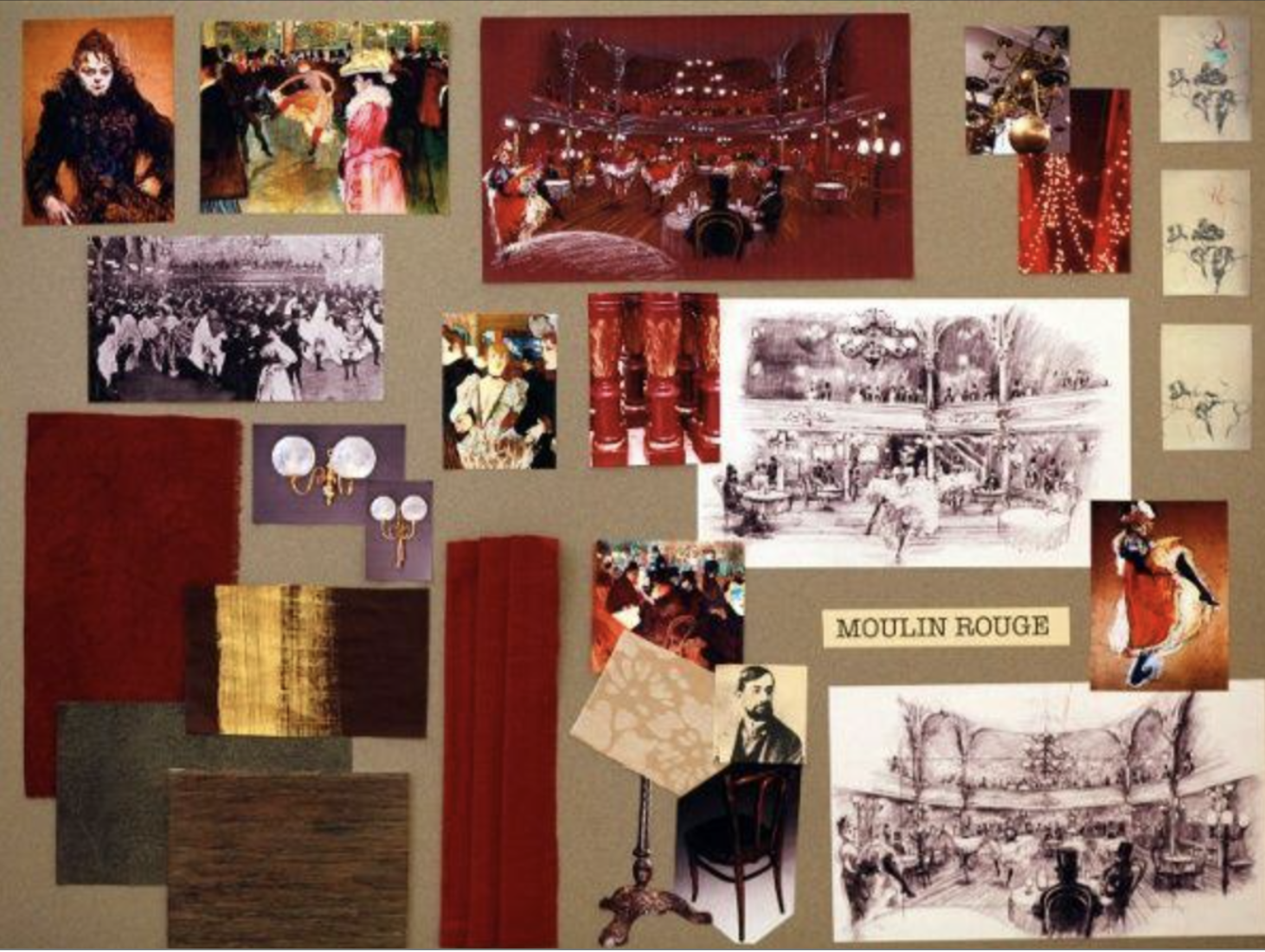
Production Mood Boards
Why: Mood boards help you and your team visualize the tone, style, and emotional atmosphere of your project before production. They align everyone on color palettes, lighting choices, textures, locations, and the overall “feel” of the piece.
How: Collect 5–10 images that best represent your intended mood. You can pull these from the web (films, photography, art, design references) or generate them with AI tools such as ChatGPT image generation or Midjourney. When using AI, make an effort to refine prompts to include specific details about lighting, color, and film stock (e.g., “soft golden-hour lighting, muted pastel color palette, shot on 16mm film”).
What: Assemble the images into a Google Slide show (along with script segments and storyboards), as a sequence or a collage. Provide a brief description of the visual design (lighting, color palette, texture, etc.).
Suggested types of images to include
- Film stills: Images from other films that capture the mood and aesthetic you’re aiming for.
- Concept art: Illustrations of key scenes, characters, or settings.
- Location photos: Pictures of potential filming locations.
- Character portraits: Pictures of actors or models portraying characters in the film.
- Costume designs: Images showing the style and look of the characters’ clothing.
- Architecture & interiors: Photos of buildings and spaces that fit the film’s setting.
- Nature & landscapes: Pictures of landscapes, forests, beaches, etc.
- Props & objects: Significant props or objects that play a crucial role in the film.
- Artwork & photography: Inspirational artwork that evokes the desired mood.
- Lighting references: Photos that demonstrate the lighting style and mood you want.
AI Tools for Storyboards and Moodboards
- Vizcom – AI-assisted visualization tool that can transform rough sketches into more developed images. Particularly useful for storyboarding because you can begin with your own composition and camera framing, then use AI to develop the image while preserving the basic structure of the sketch.
- Midjourney – Image-generation platform useful for developing visual concepts, locations, characters, lighting, color palettes, and cinematic reference images. Midjourney is especially useful for creating cohesive moodboard imagery and exploring different visual styles.
- OpenArt AI – AI image-generation and editing platform with tools for creating cinematic images, maintaining character consistency, working from reference images, and generating variations. It can be useful for both storyboard frames and moodboards, especially when you want to experiment with characters, environments, lighting, and visual style.
Before and Then After Case Study – AI workflow for working on a movie
Story Beat Workshop
In-class small group discussion of story beats. Each student will present their story idea and beat sheet to the group. The group will provide feedback and suggestions for improvement. After the workshop, students will revise their beat sheets and write their formatted scripts.