Week 10: Media, Drawing & Animation
To Do This Week
Explore the front-end modules this week and next. By the end of Week 11 you will have tried five techniques you can combine in your two Front-End Module Projects.
Keep a running list of combination ideas as you go. Each sandbox ends with one question: What would I combine this with?
Front-End Module Projects (10% + 10%)
Complete two independent projects after exploring the course’s front-end modules. Each project must combine at least two of the following:
- HTML5 Audio or Video
- Canvas drawing or animation (or SVG)
- p5.js
- An API using
fetch() - Canvas game techniques
The projects should demonstrate creative intent rather than merely showing that a feature works. These are small ways to play with techniques that can lead toward your final project.
Minimum Requirements for Each Project
- At least two front-end modules used in combination
- An original concept, visual approach, or interactive purpose
- Functional, tested JavaScript
- A responsive and readable interface
- A project statement and numbered logic steps
- Complete documentation of AI use
Using AI
You may use AI to research and test out an idea. If you use AI to build logic steps and syntax, use JS Mentor. Document what AI contributed and how you evaluated, changed, and extended the generated material. Include chat URLs in your script comments.
Monday: Audio/Video, SVG & Canvas Drawing
There are three ways to put expressive media on a page with JavaScript:
- Audio and video are elements you control: play, pause, seek, loop, respond to events.
- SVG keeps every shape in the DOM. You change a shape’s attributes and it updates instantly.
- Canvas turns everything into pixels. You paint with code, and to change anything you clear and redraw.
HTML5 Audio & Video
Sound and moving image are often the fastest way to give a project mood. They also combine easily with everything else this week: a click on an SVG shape plays a sound, a video drives a canvas, a game event triggers a sound effect.
Audio with JavaScript
const chime = new Audio('chime.mp3');  // load a sound file

chime.play();           // play it
chime.pause();          // pause it
chime.currentTime = 0;  // rewind to the start (so it can retrigger)
chime.volume = 0.5;     // 0 to 1
chime.loop = true;      // repeat
Video with JavaScript
<video id="clip" src="clip.mp4" muted playsinline></video>

const clip = document.getElementById('clip');

clip.play();
clip.pause();
clip.playbackRate = 0.5;   // slow motion (2 = double speed)
clip.currentTime = 10;     // jump to 10 seconds

// Run code as the video plays
clip.addEventListener('timeupdate', () => {
  console.log(clip.currentTime + ' / ' + clip.duration);
});

// Run code when it finishes
clip.addEventListener('ended', () => {
  console.log('done');
});- Browsers block sound until the user interacts (a click or key press). Start audio inside an event listener, not on page load. Muted video can autoplay.
- Use
.mp3for audio and.mp4(H.264) for video for the widest browser support. - Canvas can draw video frames:
ctx.drawImage(clip, 0, 0, 600, 400)inside an animation loop. That is one way to combine video and Canvas. - References: HTML Audio/Video DOM Reference
SVG (Scalable Vector Graphics) and JS
- Best used when you want crisp, scalable graphics that stay sharp at any size and can be easily changed with JavaScript.
- SVG is made of vector shapes (lines, paths, circles, text). Each part of the graphic exists as an individual element in the HTML.
- Select pieces with JavaScript or CSS and change their color, size, or position, or trigger small animations like hover effects, fades, rotations, or simple movements.
- Ideal for logos, icons, diagrams, infographics, maps, and illustrations where interaction is light but precise.
- Create artwork in Adobe Illustrator, then export it as SVG (File → Export → Export As → SVG). Paste the
<svg>...</svg>code directly into your HTML so you can target individual shapes with JavaScript.
From Illustrator to JavaScript
- Name your layers clearly in Illustrator before exporting. Layer names become
ids. - Export as SVG and open the SVG code.
- Paste the
<svg>block into your HTML. - Check that the ids match what you expect, then select them with
getElementById().
New Syntax
const face = document.getElementById('face');

face.setAttribute('fill', 'lightblue');               // change color
face.setAttribute('r', '150');                        // change radius
face.setAttribute('transform', 'rotate(15 300 300)'); // rotate around center
face.removeAttribute('transform'); // undo- Common attributes:
circle→cx, cy, r·rect→x, y, width, height, rx·line→x1, y1, x2, y2·ellipse→cx, cy, rx, ry· any shape →fill, stroke, stroke-width, opacity, transform - Path data (
d):M= move to,L= line to,A= arc,Z= close. For example,M 220,370 A 80,80 0 0,0 380,370draws a smile. Flip the last flag to1to make it a frown. - viewBox gives SVG its own coordinate space.
viewBox="0 0 600 600"means shapes use 600 × 600 units, whatever size the SVG is displayed at. To get mouse position in SVG units, scale it:(e.clientX - rect.left) * (600 / rect.width).
Demos
- SVG Smiley — every shape is a live element; pupils follow the mouse with
setAttribute() - SVG Smiley Sandbox — sliders, animations, snippets, and a live JS console
- svg-smiley-interactive.html
- d3-bar-chart.html
- Von’s interactive website: Phone Game
- SVG Clock — design element
Canvas: JS Drawing
- A blank drawing surface that JavaScript paints onto using coordinates, like a digital sketchpad.
- Once something is drawn, it doesn’t remain as a separate object in the DOM. It becomes pixels.
- To change anything, you clear the canvas and redraw everything. This is why drawing code usually lives inside a function, like
drawFace(). - Better suited than SVG for particle systems, physics, generative art, constantly updating visuals, and games.
Setting Up
<canvas id="myCanvas" width="600" height="600"></canvas>

const c = document.getElementById('myCanvas');
const ctx = c.getContext('2d');   // the drawing toolkit
Important: CSS width and height only change the display size. The drawing size comes from the width and height attributes on the <canvas> tag. If CSS stretches a 600 × 600 canvas to 800px, your drawing commands still use 600 × 600 coordinates.
Basic Drawing Methods
beginPath()– Begins a new path or resets the current path.moveTo(x, y)– Moves the “pen” to a starting position without drawing.lineTo(x, y)– Draws a straight line from the current position to the given coordinates.arc(x, y, radius, startAngle, endAngle, counterclockwise)– Draws a circle or arc.rect(x, y, width, height)– Draws a rectangle.fill()– Fills the current shape withfillStyle.stroke()– Outlines the current path withstrokeStyleandlineWidth.closePath()– Connects the last point to the first, closing the shape.clearRect(0, 0, c.width, c.height)– Erases the canvas before redrawing.-
Adding text:
ctx.font = "30px Arial";
ctx.fillText("Hello, Canvas!", 50, 200);
ctx.fillText(text, x, y, [maxWidth])– maxWidth scales the text to fit. - Use
ctx.save()andctx.restore()to reset settings and avoid affecting later drawings.
Drawing Circles and Arcs
- ctx.arc(x, y, radius, startAngle, endAngle, counterclockwise);
- x, y: The center of the arc
- radius: The distance from the center to the edge
- startAngle / endAngle: In radians.
0toMath.PIis a half circle (bottom half);0to2 * Math.PIis a full circle. - counterclockwise (optional):
truedraws counterclockwise (clockwise by default)
Mouse Position on the Canvas
c.addEventListener('mousemove', (e) => {
  const rect = c.getBoundingClientRect(); // canvas position on the page
  const mx = e.clientX - rect.left;       // mouse x inside the canvas
  const my = e.clientY - rect.top;        // mouse y inside the canvas
  drawFace(mx, my);                       // redraw with new values
});
Demos
- Canvas Smiley: Drawing — the face built step by step with paths and arcs
- Canvas Smiley: Interaction — pupils follow the mouse, kept inside the eye
- canvas-smiley.html
- Canvas Clock Example
- Canvas Element | Canvas Reference
Compare: open the SVG Smiley and the Canvas Smiley side by side. Both make the pupils follow the mouse with the same constrainPupil() math. SVG moves two circles with setAttribute(). Canvas clears and repaints the whole face on every mouse move.
Monday In-Class Sandbox
Make your own face, figure, or object that responds to the user. Choose SVG or Canvas.
- Start from one of the smiley demos. Use the coordinate display to find positions.
- Change the drawing into something of your own: a creature, a mask, a machine, an object with a personality.
- Add one interaction: hover, click, mouse tracking, or a slider.
- Add a sound with
new Audio()that plays on that interaction.
What would I combine this with? Write one sentence in a comment at the top of your script.
Wednesday: Canvas Animation & p5.js
Canvas Animation
Canvas animation is drawing frame by frame. Each frame you clear the canvas, update values (position, size, color), and redraw. Repeat that many times per second and you get motion.
The Animation Loop
let x = 0;        // position
let speed = 2;    // velocity: how far it moves each frame

function animate() {
  ctx.clearRect(0, 0, c.width, c.height);  // 1. clear

  x += speed;                               // 2. update
  if (x > c.width || x < 0) speed *= -1;   //    bounce at the edges

  ctx.beginPath();                          // 3. draw
  ctx.arc(x, 300, 20, 0, 2 * Math.PI);
  ctx.fill();

  requestAnimationFrame(animate);           // 4. repeat
}

animate();requestAnimationFrame()asks the browser to call your function before the next repaint, about 60 times per second. It is smoother than a timer and pauses when the tab is hidden.setTimeout()/setInterval()are fine for slow, stepped changes, like the face’s eyes shifting once per second.- Many objects: store them in an array and update each one with
forEach(). That is how the rain and snow demos work.
Demos
Generative Art
Generative visual art is digital art made using computer algorithms. Artists use programming tools like Processing or its JavaScript version p5.js to set rules. The computer then creates art by following these rules, leading to unique and sometimes changing images or animations. The artist decides the starting point, but the computer’s actions create the final piece.
GENERATIVE ART: Art created using autonomous processes
AUTONOMOUS PROCESS: A process not under direct human control
- Algorithmic/Rule-Based: Setting up strict rule systems to generate visual outputs.
- Randomness & Noise: Introducing randomness (e.g., Perlin noise) to simulate organic or chaotic patterns.
- Iterative / Recursive Approaches: Fractals and other self-similar patterns, such as recursive subdivisions.
— Amy Goodchild
random() vs. noise()
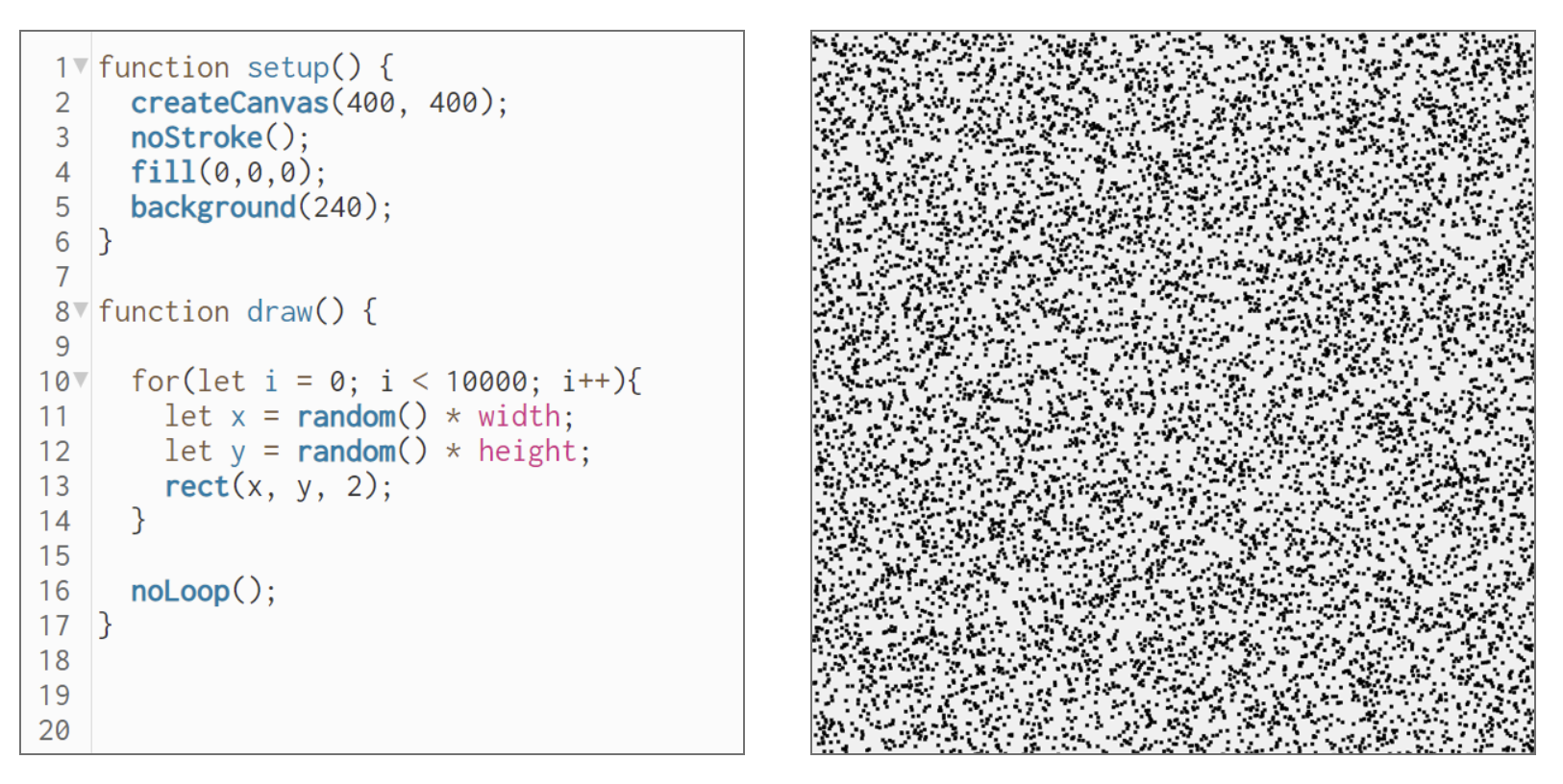
random() generates pseudorandom numbers: a value between 0 and 1, a number within a range, or a random element from an array. Each value jumps independently of the last, which is useful for unpredictability and variation.
noise() generates Perlin noise: smooth, gradient-based randomness. Values change gradually, which makes them ideal for organic patterns, textures, terrain, clouds, and natural-looking motion.
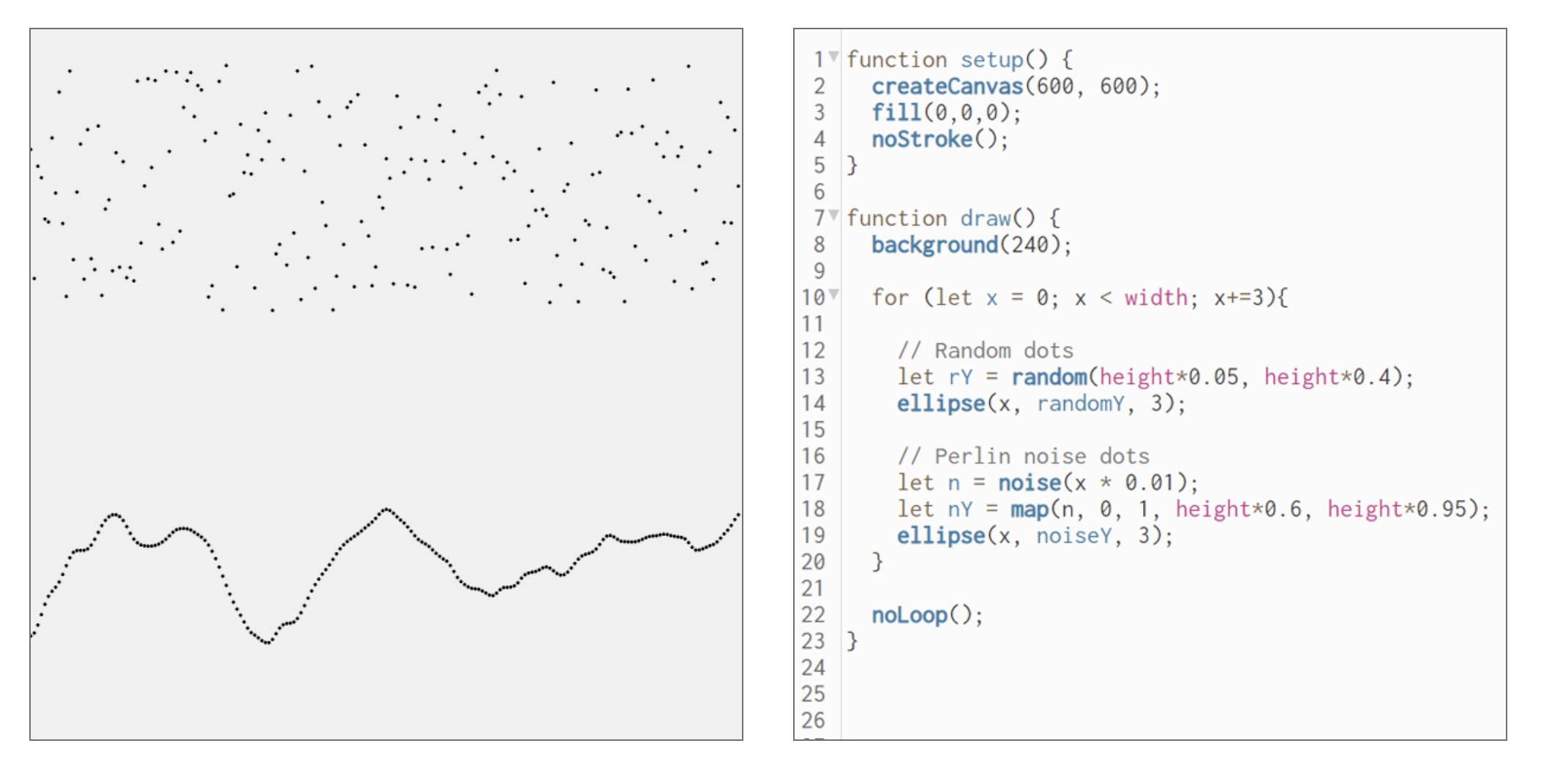
Images from Amy Goodchild’s What is Generative Art. Try it yourself: random() vs noise().
Vera Molnár
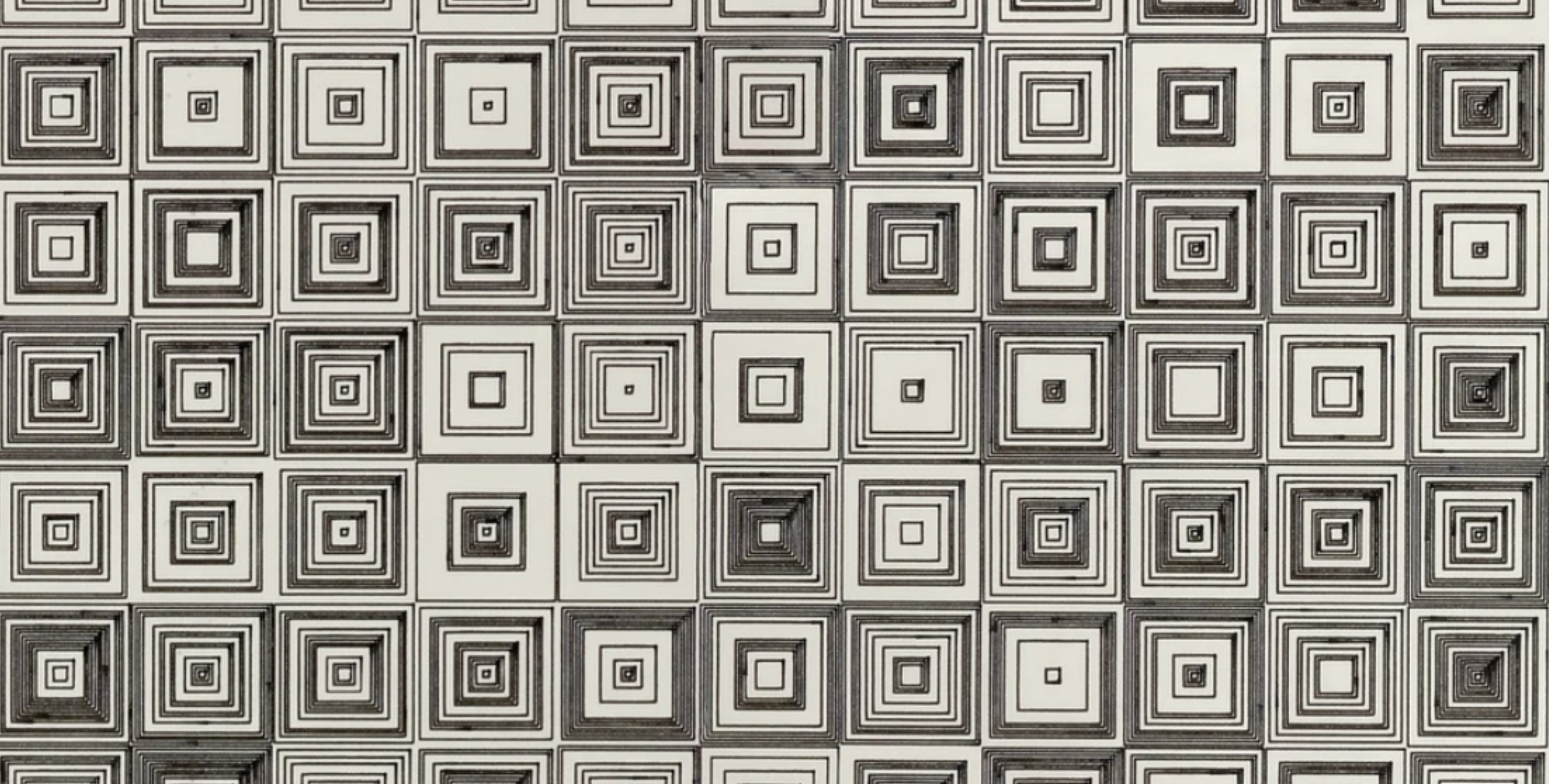
Vera Molnár (1924–2023) was a Hungarian-French artist recognized as one of the earliest pioneers of generative and computer-based art. In the late 1960s, she began systematically using computers, an uncommon practice at the time, to explore geometric forms and algorithmic variations. Her rule-based series of drawings reveal slight, methodical permutations in composition, showing how simple computational rules can generate nuanced aesthetic complexity.
John Conway
John Conway’s Game of Life (p5.js simulation) — complex, lifelike patterns from a few simple rules.
p5.js
p5.js is a JavaScript library that makes Canvas drawing and animation simpler. It runs the animation loop for you and adds tools for randomness, noise, color, and transformation.
New Syntax
function setup() {          // runs once at the start
  createCanvas(600, 600);
}

function draw() {           // runs every frame (about 60 per second)
  background(20, 20);       // low alpha leaves trails
  let x = noise(frameCount * 0.01) * width;  // smooth drifting value
  let size = random(5, 30);                  // jittery value
  fill(255);
  circle(x, height / 2, size);
}setup()runs once.draw()repeats every frame. This replaces your ownrequestAnimationFrame()loop.frameCount— how many frames have been drawn. Useful as a clock.width/height— the canvas size.random(min, max)— jumpy values.noise(t)— smooth values between 0 and 1.map(val, inMin, inMax, outMin, outMax)— converts a value from one range to another (for example, mouse x to color).push()/pop()withtranslate(),rotate(),scale()— move and turn the drawing context, then restore it.- p5.js
arc(x, y, w, h, start, stop)uses width and height. Canvasarc(x, y, radius, start, end)uses a radius.
p5.js Starter Sketches
- p5js shapes
- p5js square grid
- p5js animating with frameCount
- p5js drawing
- p5js velocity
- p5js bouncing balls
- p5js HTML starter template — for moving a sketch from the editor to your own page
p5.js Demos
Generative Techniques to Explore
Use these sample prompts with AI to see each technique quickly. Then change the rules and values yourself.
Flow Fields
A grid where each cell holds a vector that steers particles moving across it. With noise generating the vectors, the paths look like wind, water, or magnetic currents. Tyler Hobbs on flow fields.
Prompt: “Write a p5.js sketch that creates a flow field using Perlin noise, where 100 particles move according to the flow vectors. The sketch should visualize the paths in real time.”
Perlin Noise Fields
Sampling noise across a grid and over time produces textures like clouds, terrain, or smoke.
Prompt: “Generate p5.js code that draws a 2D Perlin noise field in grayscale, continuously updating over time to look like clouds.”
Particle Systems
Many small particles follow simple rules, often released from an emitter. Add gravity, drag, and variation to simulate fire, smoke, sparks, or dense evolving compositions.
Prompt: “Create a p5.js sketch of a particle system where new particles are emitted from the bottom center of the screen and rise upwards, fading out over time.”
Boids / Flocking
Craig Reynolds’s model of bird flocking: each boid follows rules of separation, alignment, and cohesion, and group movement emerges.
Prompt: “Write a p5.js sketch implementing boids flocking with 50 boids. They should avoid overlapping, try to move with neighbors, and stay within the canvas area.”
Fractals & Recursion
Recursive functions draw self-similar patterns across scales: trees, L-systems, the Mandelbrot set.
Prompt: “Generate a p5.js fractal tree sketch that uses recursion to draw multiple branches from each node, with sliders to control branch angle and depth.”
Cellular Automata
Each cell in a grid changes state based on its neighbors. Conway’s Game of Life is the classic example.
Prompt: “Create a p5.js version of Conway’s Game of Life with a grid of 50×50 cells, using random initialization, and animate each generation.”
Data Visualization & Sonification
Data encoded as color, position, shape, or sound. Next week’s fetch() module brings in live data you could visualize this way.
Prompt: “Create a p5.js data visualization of US debt over 50 years.”
Wednesday In-Class Sandbox
Make a small animated piece that expresses a mood. Choose plain Canvas or p5.js.
- Start from a demo: the snowfall or rain demo, a p5.js starter sketch, or a sample prompt above.
- Change at least one rule, not just a value: how things move, how they are born and die, how they respond to the mouse.
- Try swapping
random()fornoise()(or the reverse) and notice how the feeling changes. - Optional: add a sound or a looping audio track that fits the mood.
Use AI freely to research and test ideas today. If you take an idea further toward a project, use JS Mentor to work out the logic steps and syntax.
What would I combine this with? Add one sentence to your list.
p5.js Resources
- p5.js online editor — play with values here, then move the sketch to an HTML page
- p5.js reference
- p5.js examples
- p5.js overview
- p5.js video tutorials (The Coding Train)
- How to code generative art with p5.js
- p5.js showcase
- OpenProcessing — community of generative artists